iShellPro · Next-Gen High-Performance SSH Terminal
6 Protocols, I'm All You Need
SSH · SFTP · RDP · VNC · Monitoring · AI — natively compiled, 100K+ users, one tool for all remote connections
Under 30MB installer, <1s startup, natively compiled (not Electron)
Developers & DevOps engineers worldwide
Actively iterating and improving
Win/Mac/Linux/Android/iOS
Rapid iteration, overnight bug fixes
Powerful Features, All-in-One
Covers the entire DevOps workflow for maximum efficiency
SSH Terminal Management
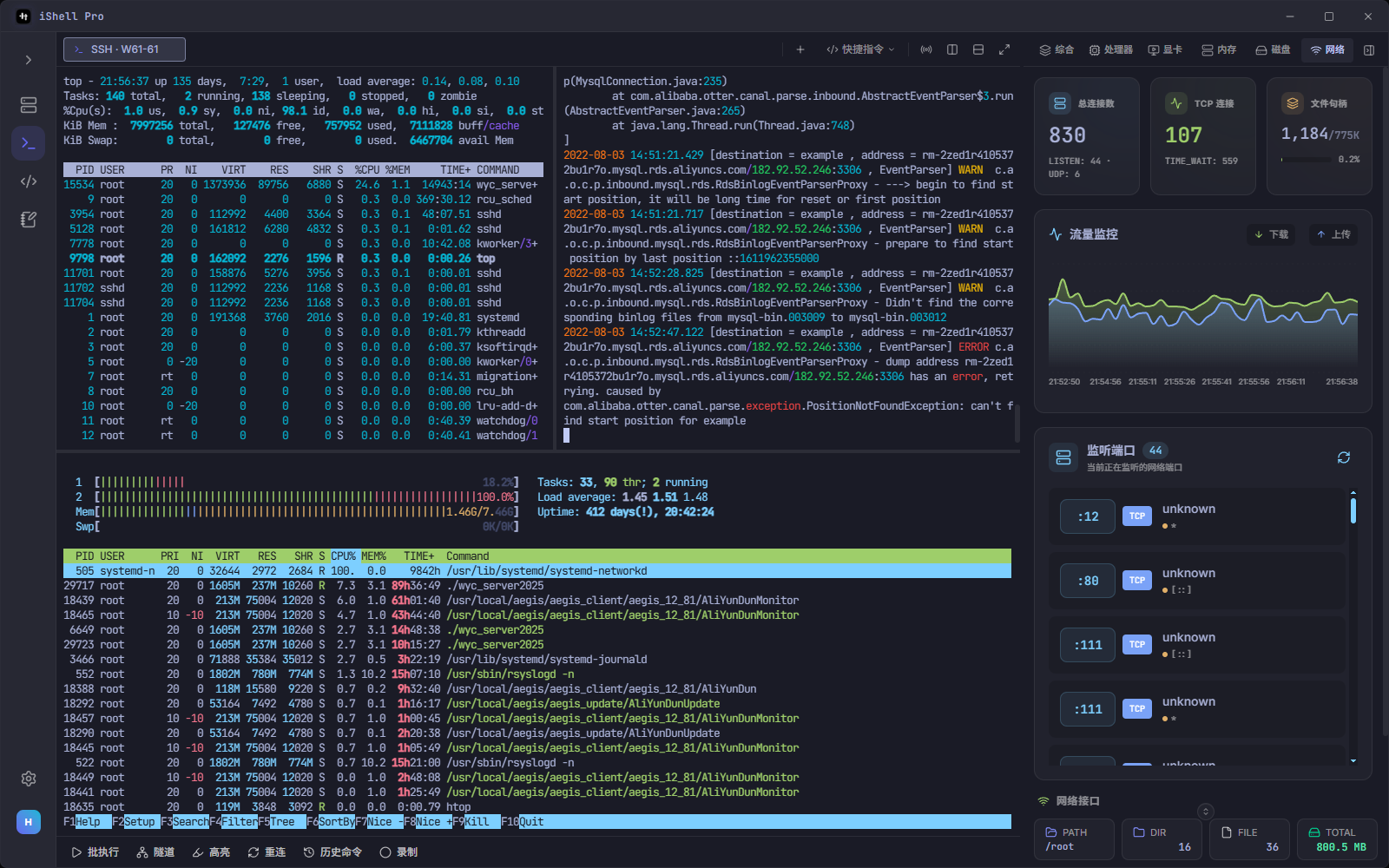
Unlimited tabs, flexible split panes (up to 16), session recording & GIF export
SFTP File Management
Visual tree directory, drag & drop batch transfers, remote file editing, remote compression
AI Smart Assistant
Built-in LLM channel ready to use, or connect your own API/Ollama for command translation, log analysis, script generation
Real-time Server Monitoring
CPU/Memory/Disk/GPU/Network/Process dashboard, no agent required
SSH Tunnel & Port Forwarding
Local/remote forwarding, SOCKS5 proxy, one-click tunnel management, real-time traffic monitoring
Cloud Sync & Code Snippets
Cross-device sync for host configs & code snippets, grouped tags, full-text search
Why iShellPro
Security, performance, cross-platform — all covered
Military-grade Security
AES-256-GCM encryption + hardware-bound keys. Enterprise edition supports fully offline deployment, zero telemetry
Native Performance
System-level native compilation, not Electron, instant startup, under 30MB, minimal memory usage
Cross-Platform
Full coverage across Windows / macOS / Linux / Android / iOS, operate anywhere anytime
AI-Powered Terminal
Built-in LLM channel ready to use, or connect your own AI service
Natural Language Interaction
Describe tasks in natural language, AI generates executable commands, inserted directly into terminal
Smart Command Explanation
Right-click terminal content to invoke AI for detailed explanations and optimization suggestions
Intelligent Log Analysis
Paste error logs for automatic anomaly detection with troubleshooting steps and fix suggestions
Flexible Model Integration
Built-in LLM channel, also supports OpenAI / Claude / Ollama and custom models
AI chat data is never stored · Enterprise supports private intranet models, fully offline
6 Protocols · Unified Management
One tool for all remote connection scenarios
Who Uses iShellPro
From individual developers to enterprise DevOps teams
DevOps Engineers
Batch connect hundreds of servers, real-time cluster monitoring, quick disk anomaly detection
Backend Developers
Remote debugging, log tracing, rapid deployment — SFTP config edits take effect instantly
DBAs
SSH tunnel for secure DB access, local port forwarding without VPN, credentials never written to disk
Security Auditors
Session recording & GIF export, audit logging with data masking, compliance ready
Enterprise Intranet Ops
Enterprise fully offline, zero networking/telemetry, professional terminal for air-gapped networks
Education & Training
Ideal for Linux teaching, intuitive interface, built-in AI helps students get started quickly
Compare with Alternatives
An objective feature comparison table
| Feature | iShellPro | Xshell | FinalShell | Termius |
|---|---|---|---|---|
| AI Smart Assistant | ||||
| Native Build · High Performance | ||||
| SSH / SFTP / RDP / VNC | ||||
| Telnet / Serial Port | ||||
| Real-time Server Monitoring (Agentless) | ||||
| SSH Tunnel & Port Forwarding | ||||
| X11 Forwarding | ||||
| All Platforms (incl. Mobile) | ||||
| Cloud Sync | ||||
| ZModem in-terminal transfer | ||||
| Enterprise Offline Private Deployment | ||||
| Free Core Features |
And Much More
Actively iterating with frequent updates, moving steadily forward
Ready to get started?
Free download, under 20MB lightweight install, instant startup
FAQ
Is iShellPro free?
Core features are free for long-term use. Advanced features require a Pro subscription. Free version has unlimited connections and tabs.
Does AI require internet?
Built-in LLM channel requires network, no API Key needed. Also supports OpenAI / Claude / Ollama. Enterprise edition supports private intranet models, fully offline.
How is data security ensured?
All credentials encrypted with AES-256-GCM, keys bound to hardware fingerprint. Database copies are undecryptable on other devices. No telemetry SDK, zero data collection.
Which operating systems are supported?
Supports Windows 10+, macOS (Apple Silicon & Intel), Linux (Ubuntu/Debian etc.), Android, and iOS. Configs sync across devices via cloud.
Can I migrate from existing tools?
One-click import from XShell, SecureCRT, MobaXterm, FinalShell, XTerminal, and PuTTY. Migration takes just minutes.
What advantages over Xshell / FinalShell / Termius?
Natively compiled (not Electron), with faster startup and lower memory than alternatives. One tool covers SSH/SFTP/RDP/VNC/Telnet/Serial — with built-in AI, live monitoring, and SSH tunnels.
What's the difference between Enterprise and Personal?
Enterprise edition supports fully offline deployment (air-gapped networks), zero telemetry, offline license activation, custom branding, and unlimited features. Visit the Enterprise page for details.
Still Alt+Tabbing Between Tools?
One iShellPro Is All You Need · SSH · SFTP · RDP · VNC · AI
Need to deploy on intranet or air-gapped network?
iShell Enterprise is built for high-security environments — zero networking, zero telemetry, zero cloud dependency. Offline license activation, all online modules removed at build time.